Question: How do I connect the Laser 2.1CH Soundbar to my TV using HDMI ARC?
Answer:
Model reference: SP-SB16WW-851
Applies to: SP-SB16WW-851
If your SKU differs, search our support page by your Model SKU to find the correct article.
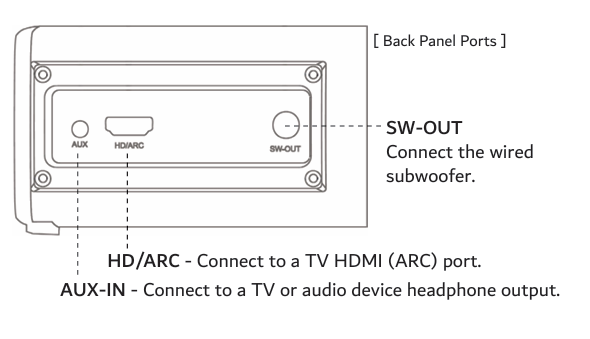
To connect the Laser 2.1CH TV Soundbar with Wired Subwoofer to your TV using HDMI ARC:
1. Connect an HDMI cable to the HD/ARC port on the soundbar.
2. Connect the other end of the HDMI cable to the HDMI port labelled ARC on your TV.
3. Turn on the TV and the soundbar.
4. Press the Mode button until ARC mode is selected.
5. Open your TV sound or audio settings.
6. Set the TV audio output to HDMI ARC, External Speaker or Audio System.
7. Turn HDMI CEC on if your TV requires it.
Many TVs require HDMI CEC to be enabled for ARC sound to work. Common HDMI CEC names include:
- Samsung - Anynet+
- LG - Simplink
- Hisense - HDMI CEC or Anyview CEC
- TCL - T-Link or HDMI CEC
If there is still no sound:
- Check that the HDMI cable is connected to the TV port labelled ARC.
- Restart the TV and soundbar.
- Confirm the soundbar is set to ARC mode.
Was this article helpful?
That’s Great!
Thank you for your feedback
Sorry! We couldn't be helpful
Thank you for your feedback
Feedback sent
We appreciate your effort and will try to fix the article