Question: How do I set up and pair my V-Fitness Kids Smart Watch?
Answer:
Model reference: VF-M4KFYPK-193 (Pink), VF-M4KFYBK-186 (Black)
Applies to: VF-M4KFYPK-193, VF-M4KFYBK-186
If your SKU differs, search our support page by your Model SKU to find the correct article.
1. Press and hold the Function button to turn on the watch.
2. Follow the setup prompts on the watch screen. You may be asked to confirm language, measurement units, age and profile information, date and time.
3. Turn on Bluetooth on your smartphone.
4. From the watch home screen, swipe right and scan the QR code displayed on the watch.
5. Download and install the VeryFit app.
6. Open the VeryFit app and log in or create a VeryFit account.
7. Tap Device on the bottom menu, then tap Add Device.
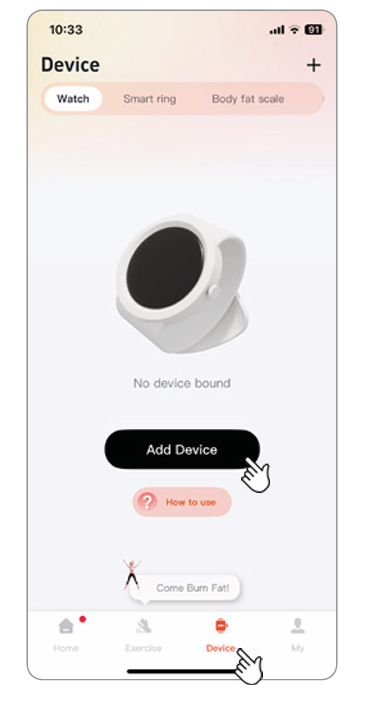
8. Select verfit watch 01.
9. Pair the watch through the VeryFit app only. Do not connect the watch directly through your phone Bluetooth settings.
10. Allow the requested app permissions so features such as activity data and notifications can work correctly.
Once paired, the watch time will update automatically. You can also use the VeryFit app to view activity data and change settings.
This applies to the V-Fitness Kids Smart Watch with Apple Find My.

Was this article helpful?
That’s Great!
Thank you for your feedback
Sorry! We couldn't be helpful
Thank you for your feedback
Feedback sent
We appreciate your effort and will try to fix the article