Question: How do I set up Apple Find My on the V-Fitness Kids Smart Watch?
Answer:
Model reference: VF-M4KFYPK-193 (Pink), VF-M4KFYBK-186 (Black)
Applies to: VF-M4KFYPK-193, VF-M4KFYBK-186
If your SKU differs, search our support page by your Model SKU to find the correct article.
1. Press the Function button on the watch.
2. Open Find My Management.
3. Make sure the watch shows the message asking you to connect it in the Find My app.
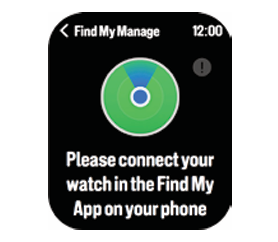 4. On your iPhone or iPad, open the Find My app.
5. Select the Items tab.
6. Tap +, then tap Add Other Item.
7. Select verfit watch 01.
8. Follow the instructions to complete setup.
The Apple Find My app is not available on Android devices. Apple Find My setup requires a compatible Apple device and Apple ID.
This applies to the V-Fitness Kids Smart Watch with Apple Find My.
Was this article helpful?
That’s Great!
Thank you for your feedback
Sorry! We couldn't be helpful
Thank you for your feedback
Feedback sent
We appreciate your effort and will try to fix the article