Question: How do I connect the console to a TV with HDMI?
Answer:
Model reference: GM-REHD3I-742
Applies to: GM-REHD3I-742
If your SKU differs, search our support page by your Model SKU to find the correct article.
To connect the Laser Retro Handheld Game Console to a TV with HDMI input:
1. Turn off the console and TV.
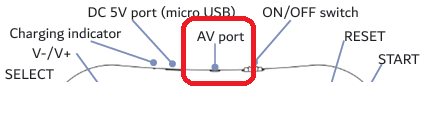
2. Connect the AV cable to the console's AV port.
3. Match the yellow, red and white RCA plugs to the AV-to-HDMI adapter inputs.
4. Connect an HDMI cable from the adapter output to an HDMI port on the TV.
5. Power the AV-to-HDMI adapter using a suitable 5V USB power source.
6. Turn on the TV and select the matching HDMI input.
7. Turn on the console.
The HDMI cable is not supplied.
Was this article helpful?
That’s Great!
Thank you for your feedback
Sorry! We couldn't be helpful
Thank you for your feedback
Feedback sent
We appreciate your effort and will try to fix the article