Question: How do I charge the console?
Answer:
Model reference: GM-REHD3I-742
Applies to: GM-REHD3I-742
If your SKU differs, search our support page by your Model SKU to find the correct article.
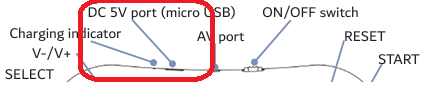
To charge the Laser Retro Handheld Game Console:
1. Make sure the rechargeable battery is installed.
2. Connect a USB cable to the DC 5V Micro USB port on the console.
3. Connect the other end to a suitable 5V USB power source.
The charging indicator glows red while charging and turns blue when the battery is fully charged.
Was this article helpful?
That’s Great!
Thank you for your feedback
Sorry! We couldn't be helpful
Thank you for your feedback
Feedback sent
We appreciate your effort and will try to fix the article