Question: How do I prepare my Laser Digital Camcorder for first use?
Answer:
Model reference: CA-CC26BK-513
Applies to: CA-CC26BK-513
If your SKU differs, search our support page by your Model SKU to find the correct article.
Before using the Laser Digital 1080p Camcorder with 16x Zoom - Black for the first time:
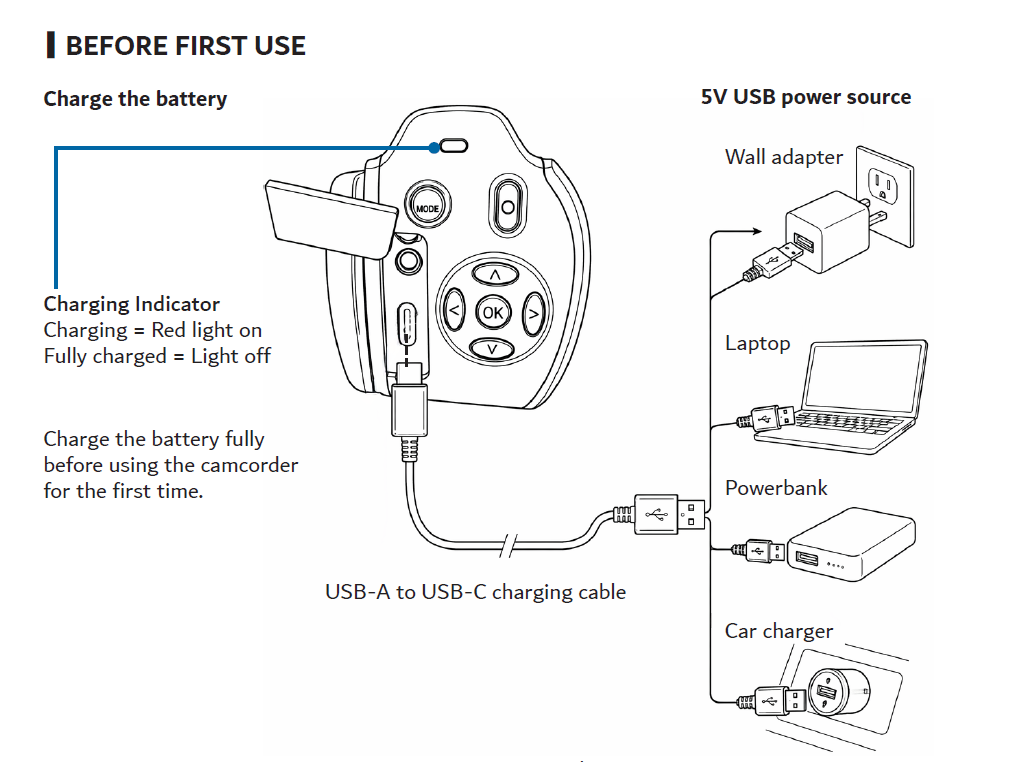
1. Connect the supplied USB-A to USB-C cable to the camcorder.
2. Connect the USB-A end to a 5V DC USB power source.
3. Charge the battery fully before first use. The charging indicator stays red while charging and turns off when charging is complete.
 4. Turn the camcorder off before inserting a microSD card.5. Insert a Class 10 microSD card with the metal contacts facing the screen. Do not force the card into the slot.
6. If the card is larger than 32GB, format it using the camcorder before recording.
A microSD card is required to save videos and store larger numbers of photos. The camcorder supports cards up to 64GB.
Was this article helpful?
That’s Great!
Thank you for your feedback
Sorry! We couldn't be helpful
Thank you for your feedback
Feedback sent
We appreciate your effort and will try to fix the article