Question: What screen size and projection distance should I use with my Laser Smart Portable Projector?
Answer:
Model reference: PJ-TUHA1CW-346
Applies to: PJ-TUHA1CW-346
If your SKU differs, search our support page by your Model SKU to find the correct article.
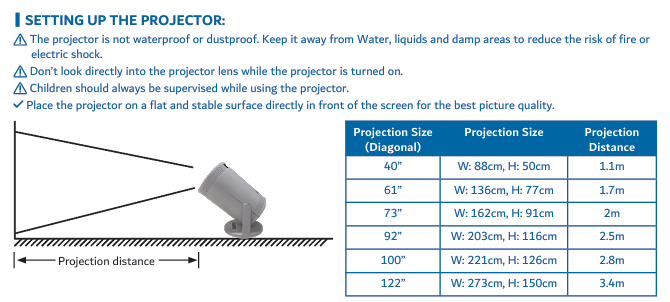
The Laser 720P HD Smart USB-C Portable Projector - White supports projected images from 40 to 122 inches diagonally.
Use this distance guide:
- 40-inch image: approximately 1.1 m
- 61-inch image: approximately 1.7 m
- 73-inch image: approximately 2.0 m
- 92-inch image: approximately 2.5 m
- 100-inch image: approximately 2.8 m
- 122-inch image: approximately 3.4 m
A 100-inch foldable cloth screen and mounting hooks with double-sided tape are included.
For better picture quality:
1. Place the projector on a flat, stable surface directly in front of the screen.
2. Keep the screen flat, smooth and taut without overstretching it.
3. Minimise ambient light reaching the screen.
4. Keep the screen away from heaters, radiators, air conditioners and other heat sources.
Was this article helpful?
That’s Great!
Thank you for your feedback
Sorry! We couldn't be helpful
Thank you for your feedback
Feedback sent
We appreciate your effort and will try to fix the article