Question: How do I fix a blurry or distorted picture on my Laser Smart Portable Projector?
Answer:
Model reference: PJ-TUHA1CW-346
Applies to: PJ-TUHA1CW-346
If your SKU differs, search our support page by your Model SKU to find the correct article.
Use the focus wheel and projector position to correct the picture on the Laser 720P HD Smart USB-C Portable Projector - White.
If the image is blurry:
1. Rotate the focus wheel on top of the projector.
2. Stop when the image looks clear and sharp.
3. If it remains blurry, move the projector slightly closer to or farther from the screen.
If the image is uneven or distorted:
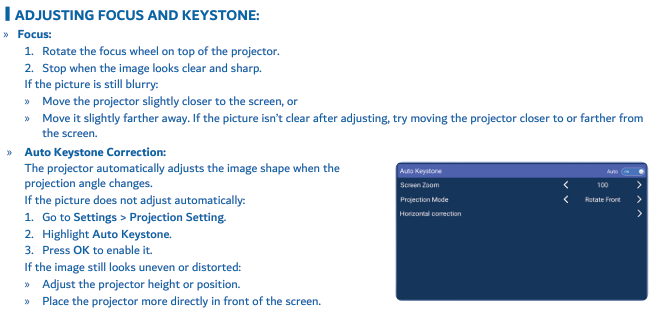
1. Wait for automatic keystone correction to finish.
2. Go to Settings > Projection Setting.
3. Highlight Auto Keystone and press OK to enable it.
4. Adjust the projector height or position.
5. Place the projector more directly in front of the screen.
The picture may briefly appear distorted or trapezoid-shaped during startup while the projector adjusts the image. This is normal.
Was this article helpful?
That’s Great!
Thank you for your feedback
Sorry! We couldn't be helpful
Thank you for your feedback
Feedback sent
We appreciate your effort and will try to fix the article