Question:
How do I fix a blurry or distorted projector image?
Answer:
Model reference: PJ-CBFWV1-810 (projector model PJ-CBFWV1-810-A)
Applies to: PJ-CBFWV1-810
If your SKU differs, search our support page by your Model SKU to find the correct article.
If the Laser Full HD Outdoor Cinema Bundle projector image is blurry:
1. Check that the projection surface is flat.
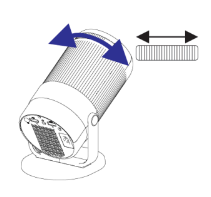
2. Turn the focus wheel slowly until the image becomes clear.
3. Move the projector slightly closer to or farther from the screen if required.
If the picture is distorted or not square:
1. Position the projector directly in front of the screen where practical.
2. Adjust the keystone correction.
3. The projector also provides automatic keystone correction through its Projection settings.
For the best result, keep the projector centred with the screen and use it in dim viewing conditions.
Was this article helpful?
That’s Great!
Thank you for your feedback
Sorry! We couldn't be helpful
Thank you for your feedback
Feedback sent
We appreciate your effort and will try to fix the article