Question: How do I connect an HDMI device to my Laser Smart Portable Projector?
Answer:
Model reference: PJ-TUHA1CW-346
Applies to: PJ-TUHA1CW-346
If your SKU differs, search our support page by your Model SKU to find the correct article.
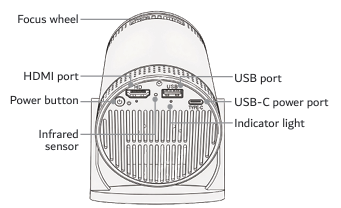
You can connect compatible DVD players, Blu-ray players and gaming consoles to the Laser 720P HD Smart USB-C Portable Projector - White through HDMI.
To connect an HDMI device:
1. Connect the external device to the projector using an HDMI cable.
2. Turn on the projector and the connected device.
3. Select HDMI on the projector's Home screen.
4. Press OK to switch to HDMI mode.
An HDMI cable is required and is not included.
Was this article helpful?
That’s Great!
Thank you for your feedback
Sorry! We couldn't be helpful
Thank you for your feedback
Feedback sent
We appreciate your effort and will try to fix the article