Question: How do I connect my laptop using an HDMI cable?
Answer:
Model reference: PC-P156TO-407
* Turn off your device and unplug it.
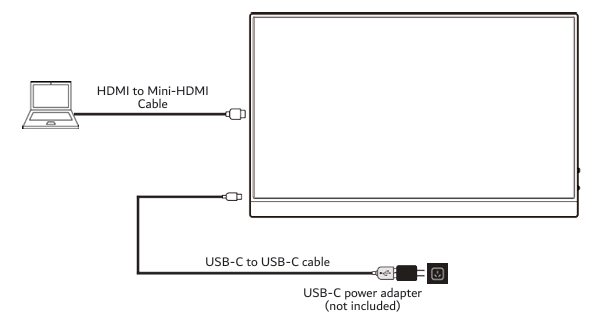
* Connect the HDMI plug to your device and the Mini HDMI plug to the monitor.
* Connect the USB-C power cable from the monitor to a USB-C power adapter (up to 100W).
* Turn on both devices.
* Use your device's settings to duplicate or extend the display.
Note that the HDMI port only carries video, so the Laser Precision 15.6" Portable Monitor with Touch Screen requires power from the USB-C port to operate.
Was this article helpful?
That’s Great!
Thank you for your feedback
Sorry! We couldn't be helpful
Thank you for your feedback
Feedback sent
We appreciate your effort and will try to fix the article