Question: How do I connect the Precision Portable Monitor using HDMI?
Answer:
Model reference: PC-P15PTM-414
Applies to: PC-P15PTM-414
If your SKU differs, search our support page by your Model SKU to find the correct article.
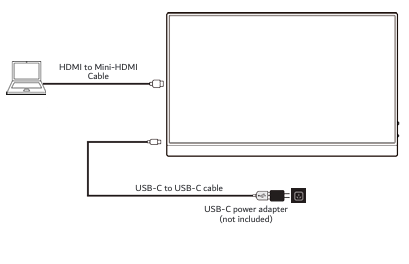
To connect using HDMI:
1. Turn off your device and unplug it.
2. Connect the HDMI plug to your device and the mini-HDMI plug to the monitor.
3. Connect the USB-C power cable from the monitor to a USB-C power adapter.
4. Turn on both devices.
5. Use your device settings to duplicate or extend the display.
The HDMI port carries video. The monitor still needs USB-C power to operate.
Was this article helpful?
That’s Great!
Thank you for your feedback
Sorry! We couldn't be helpful
Thank you for your feedback
Feedback sent
We appreciate your effort and will try to fix the article