Question: How do I mark and drill the mounting holes?
Answer:
Model reference: PC-SLG3EP-820
Applies to: PC-SLG3EP-820
If your SKU differs, search our support page by your Model SKU to find the correct article.
To prepare the mounting surface, follow the guide below.
Steps:
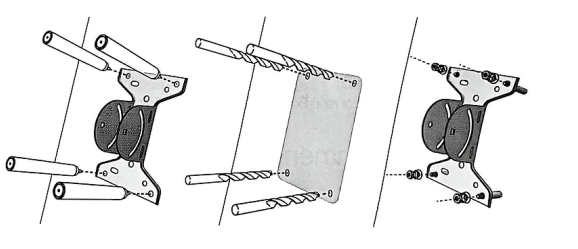
- Place the mount base in the intended position.
- Mark the mounting hole locations using a marker.
- The manual recommends using the four outermost holes.
- Drill the holes using a drill bit that matches the size of the expansion screws.
- Screw in the mount base using the provided bolts.
- Make sure the installation is stable before continuing.
These steps apply to the ChargeCore Starlink Gen3 V4 Elbow Pipe Mount installation process.
Important:
Do not continue with the pole or dish installation until the mount base is secure.
Was this article helpful?
That’s Great!
Thank you for your feedback
Sorry! We couldn't be helpful
Thank you for your feedback
Feedback sent
We appreciate your effort and will try to fix the article