Question: How do I charge the camera and use the solar panel?
Answer:
Model reference: LSH-4GDLN-776
Applies to: LSH-4GDLN-776
Here’s how charging works:
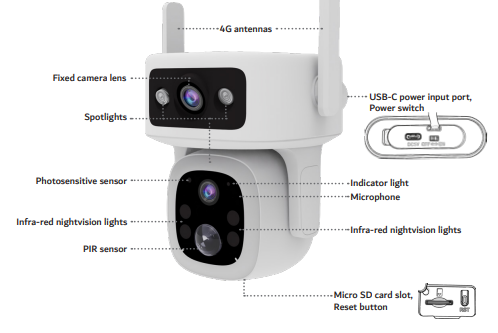
- Before first use, charge the camera using a 5V USB cable.
- Connect to a laptop, power bank, or wall adapter.
- The solar panel helps maintain battery charge during use.
- Place the solar panel in direct sunlight for best performance.
- In low sunlight or winter, charging may be slower.
The Laser Smart Home Dual Lens 4G Outdoor camera with solar panel combines battery and solar power for flexible outdoor use.
Was this article helpful?
That’s Great!
Thank you for your feedback
Sorry! We couldn't be helpful
Thank you for your feedback
Feedback sent
We appreciate your effort and will try to fix the article