Model reference: LSH-HK01-196
Applies to: LSH-HK01-196
If your SKU differs, search our support page by your Model SKU to find the correct article.
Before installing the Laser Smart Deadbolt Lock with Apple Home, check these measurements:
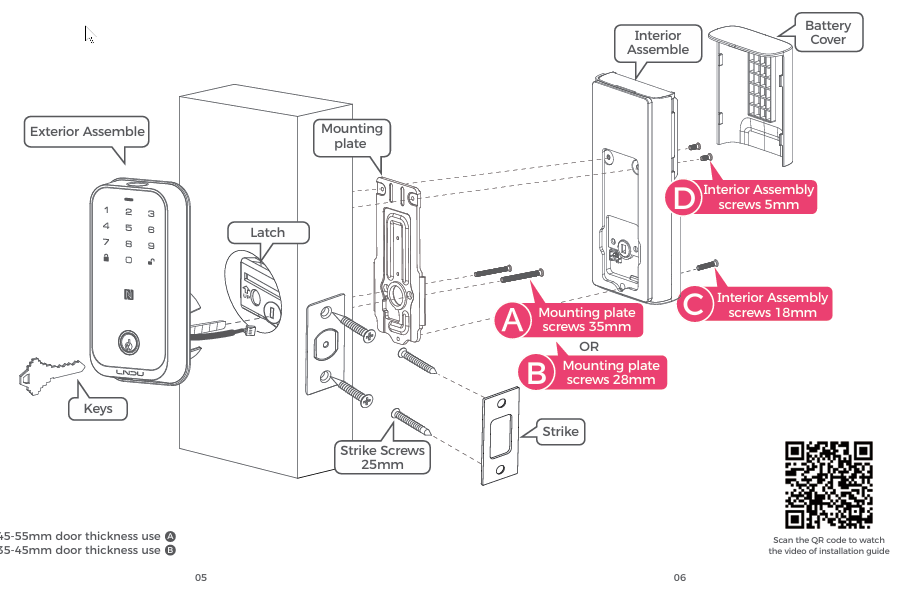
1. Door thickness: 35 to 55 mm.
2. Backset, measured from the door edge to the centre of the large hole through the door: 60 or 70 mm.
3. Cross bore, the large hole through the face of the door: 38 or 54 mm in diameter.
4. Latch hole in the door edge: 25 mm in diameter.
Check the clearance diagram in the user manual before drilling. For a 38 mm cross bore, use the 38 mm spacer as shown in the installation guide.
Was this article helpful?
That’s Great!
Thank you for your feedback
Sorry! We couldn't be helpful
Thank you for your feedback
Feedback sent
We appreciate your effort and will try to fix the article