Description: Explanation of indicator light colours and blinking patterns.
Question: What do the indicator lights on my smart wall switch mean?
Answer:
Model reference: CSH-SWITCH123
Applies to: CSH-SWITCH123
If your SKU differs, search our support page by your Model SKU to find the correct article.
The Smart Wall Switch uses indicator lights to display its operating and connection status.
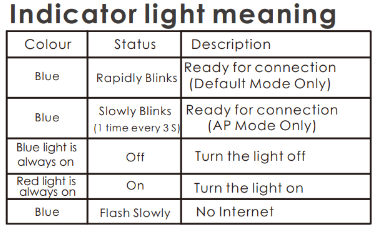
If the indicator is flashing slowly and the switch is not connected to the internet, check your home Wi-Fi connection.
If you are attempting to pair the switch, use the indicator pattern to identify the correct pairing mode.
Was this article helpful?
That’s Great!
Thank you for your feedback
Sorry! We couldn't be helpful
Thank you for your feedback
Feedback sent
We appreciate your effort and will try to fix the article