Description
How to mount the PC-RM5MST-728 LED strip light, connect the supplied adapter and shorten the strip at its designated cut lines.
Question
How do I install and shorten the Laser Gaming LED Strip Light?
Answer
Model reference: PC-RM5MST-728
Applies to: PC-RM5MST-728
If your SKU differs, search our support page by your Model SKU to find the correct article.
The Laser Gaming Multi Colour LED Strip Light has 150 LEDs across an approximately 5-metre strip. It is designed for indoor use only.
What is included?
The box contains the LED strip, infrared remote control, 10W USB-A wall adapter, mounting clips and user manual.
Installation
1. Plan the layout near a mains power outlet. The USB cable is approximately 40 cm long.
2. Make sure the mounting surface is clean, dry and stable.
3. Peel off the adhesive backing and mount the strip. Apply the adhesive once for best results.
4. Use the supplied mounting clips where needed. A Phillips head screwdriver may be required.
5. Avoid tight bends and keep the infrared receiver unobstructed.
6. Connect the strip to the supplied power adapter.
Can I shorten the strip?
Yes. Disconnect the adapter from mains power before cutting, and cut only at the designated cut lines shown in the manual.
The manual does not provide a supported method for reconnecting cut sections or extending the strip. Plan your required length before cutting.
Important safety information
Use only the supplied 10W power adapter. Do not connect the strip to another power source or driver.
Keep the strip and adapter away from water, moisture and heat sources. Do not cover them with fabric or other materials that prevent heat dissipation. Keep the product out of reach of young children and pets.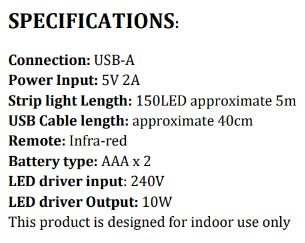
Was this article helpful?
That’s Great!
Thank you for your feedback
Sorry! We couldn't be helpful
Thank you for your feedback
Feedback sent
We appreciate your effort and will try to fix the article