Question:
How do I connect an Android phone to the projector?
Answer:
Model reference: PJ-CBFWV1-810 (projector model PJ-CBFWV1-810-A)
Applies to: PJ-CBFWV1-810
If your SKU differs, search our support page by your Model SKU to find the correct article.
The Laser Full HD Outdoor Cinema Bundle supports wired and wireless screen mirroring from compatible Android devices.
For wireless mirroring:
1. Connect the Android device and projector to the same Wi-Fi network.
2. Select Mirroring > Wireless Screen - Android on the projector.
3. Follow the Android screen mirroring instructions shown on the projector.
4. Select the projector from your device's compatible screen mirroring function.
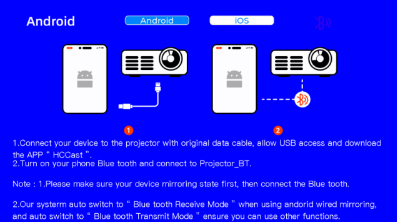
For wired mirroring:
1. Select Mirroring > Wired Screen - Android.
2. Connect the phone using a USB cable.
3. Follow the projector's prompts to install HCCast.apk.
4. Grant the permissions requested by the app where required.
Android menus and mirroring options may vary by device.
Was this article helpful?
That’s Great!
Thank you for your feedback
Sorry! We couldn't be helpful
Thank you for your feedback
Feedback sent
We appreciate your effort and will try to fix the article