Description:
Download and use the Quick Start Guide for setup, Wi-Fi, Bluetooth, apps, reset, specifications and troubleshooting information.
Question:
Where can I download the User Manual for this product?
Answer:
Model reference: PJ-CBFAC1-827
Applies to: PJ-CBFAC1-827
If your SKU differs, search our support page by your Model SKU to find the correct article.
You can download the full user manual for the Laser 1080p Smart Outdoor Projector with 144-inch Screen and Soundbar in the attached file.
The supplied Quick Start Guide covers:
- Package contents and additional setup items
- Inflatable screen setup
- Projector buttons, ports and remote controls
- Focus and keystone adjustment
- First-time setup and Wi-Fi connection
- Bluetooth remote pairing
- HDMI and USB input selection
- Bluetooth speaker connection
- Android 14 AOSP app installation and updates
- Factory reset procedures
- Product specifications
- Troubleshooting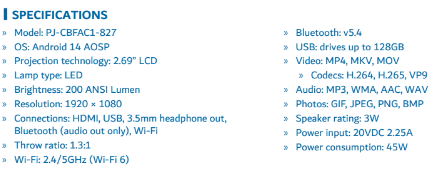
Was this article helpful?
That’s Great!
Thank you for your feedback
Sorry! We couldn't be helpful
Thank you for your feedback
Feedback sent
We appreciate your effort and will try to fix the article