Question: What do the buttons on the console do?
Answer:
Model reference: GM-REHD3I-742
Applies to: GM-REHD3I-742
If your SKU differs, search our support page by your Model SKU to find the correct article.
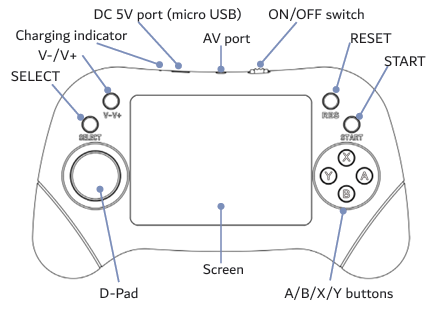
The Laser Retro Handheld Game Console uses these controls:
- D-Pad: move and navigate.
- A, B, X and Y: game action buttons.
- SELECT: select an option or open a menu.
- START: start or pause a game.
- RESET: restart the console and return to the game list.
Was this article helpful?
That’s Great!
Thank you for your feedback
Sorry! We couldn't be helpful
Thank you for your feedback
Feedback sent
We appreciate your effort and will try to fix the article