Question: How do I connect my Laser Portable LED Projector to Wi-Fi?
Answer:
Model reference: PJ-TUHW1W-339
Applies to: PJ-TUHW1W-339
If your SKU differs, search our support page by your Model SKU to find the correct article.
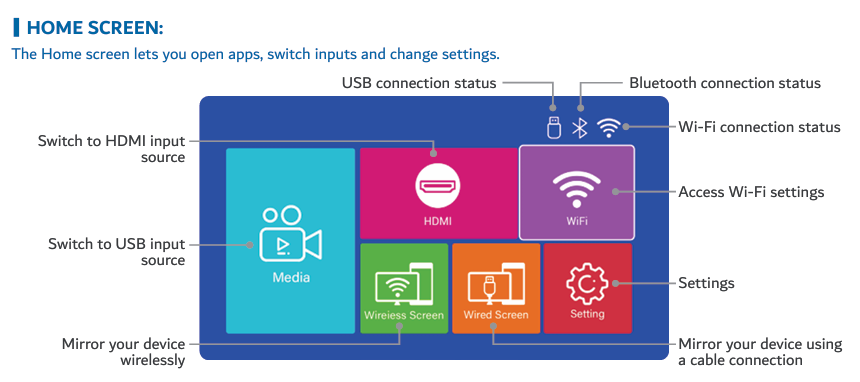
To connect the Laser 720P HD Portable Projector - White to Wi-Fi:
1. Select Wi-Fi on the projector Home screen.
2. Press OK.
3. Wait for nearby Wi-Fi networks to appear.
4. Select your Wi-Fi network.
5. Press OK.
6. Use the remote control to move around the on-screen keyboard.
7. Press OK to select the letters and numbers in your password.
8. Select Connect and press OK.
If the projector does not begin scanning for networks:
1. Check the Wi-Fi switch in the top-left corner of the Wi-Fi screen.
2. Turn Wi-Fi on.
3. Wait for the available networks to appear.
4. Select the correct network and enter its password again.
Was this article helpful?
That’s Great!
Thank you for your feedback
Sorry! We couldn't be helpful
Thank you for your feedback
Feedback sent
We appreciate your effort and will try to fix the article