Question: How do I set up my Laser Digital Calendar for the first time?
Answer:
Model reference: AO-156TDC-544
Applies to: AO-156TDC-544
To set up the Laser 15.6 Inch Digital Calendar with Touch Screen White for the first time:
1. Place the calendar on the table stand on a flat, stable surface, or mount it on a wall.
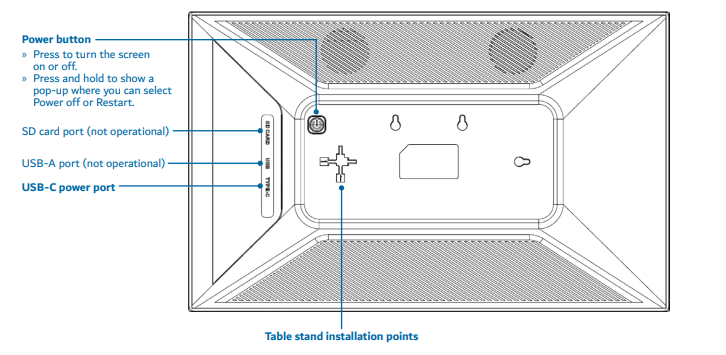
2. Connect the included power adaptor to the USB-C power port.
3. Plug the adaptor into a wall outlet.
4. Press the Power button.
5. Wait for the Whale Framely logo to appear.
6. Select your language.
7. Select your Wi-Fi network, enter your password and tap Connect.
8. Check the date, time and time zone. Adjust them if needed.
9. Choose Set up as new device.
10. If a software update is available, tap Update and wait for it to finish before continuing.
You will need:
- Home Wi-Fi and password
- A smartphone
- The Whale Framely app

- An email address to create your Whale Framely account
If your model number is different, search our support page by your Model SKU to find the correct article.
Was this article helpful?
That’s Great!
Thank you for your feedback
Sorry! We couldn't be helpful
Thank you for your feedback
Feedback sent
We appreciate your effort and will try to fix the article