Question: How do I connect the wired subwoofer to the Laser 2.1CH Soundbar?
Answer:
Model reference: SP-SB16WW-851
Applies to: SP-SB16WW-851
If your SKU differs, search our support page by your Model SKU to find the correct article.
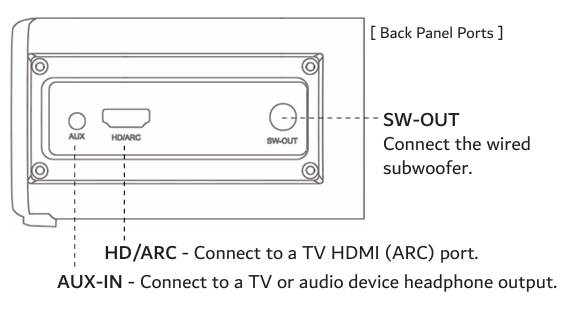
To connect the wired subwoofer included with the Laser 2.1CH TV Soundbar with Wired Subwoofer:
1. Locate the SW-OUT port on the back of the soundbar.
2. Connect the subwoofer cable to the SW-OUT port.
3. Place the subwoofer in your desired position.
4. Leave space around the subwoofer air vent for airflow.
The subwoofer works automatically once connected.
For best bass, place the subwoofer on the floor near the soundbar. Bass may improve when the subwoofer is placed near a wall or corner.
Was this article helpful?
That’s Great!
Thank you for your feedback
Sorry! We couldn't be helpful
Thank you for your feedback
Feedback sent
We appreciate your effort and will try to fix the article