Question: What should I check when connecting a phone or tablet to the Precision Portable Monitor?
Answer:
Model reference: PC-P15PTM-414
Applies to: PC-P15PTM-414
If your SKU differs, search our support page by your Model SKU to find the correct article.
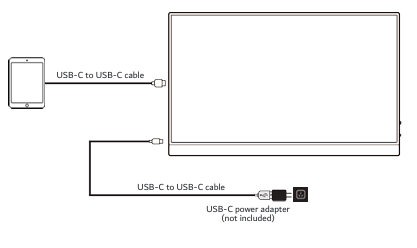
When connecting a smartphone or tablet:
1. Connect the monitor to a USB-C power adapter.
2. Connect the USB-C cable between your phone or tablet and the monitor.
3. Keep the power adapter connected during use for stable performance.
4. If the screen flickers or turns black, the phone battery may be low. Connect to power to fix this.
5. Check whether your device supports DisplayPort Alternate Mode or requires a compatible adapter.
Some iOS and Android devices may not support video output through USB-C, so device compatibility must be checked before troubleshooting the monitor.
Was this article helpful?
That’s Great!
Thank you for your feedback
Sorry! We couldn't be helpful
Thank you for your feedback
Feedback sent
We appreciate your effort and will try to fix the article