Question: Can I connect a phone or tablet to the Laser 14 Inch Portable Monitor?
Answer:
Model reference: PC-P14PTM-391
Applies to: PC-P14PTM-391
If your SKU differs, search our support page by your Model SKU to find the correct article.
You can connect a compatible phone or tablet if its USB-C port supports video output.
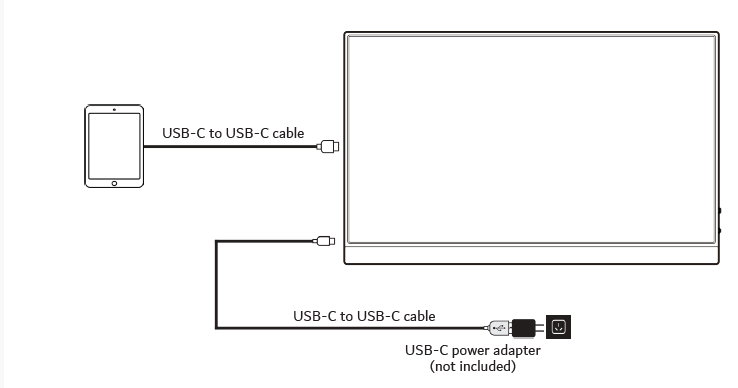
Before connecting:
- Check that the device supports USB-C video output, such as DisplayPort Alternate Mode.
- Connect external USB-C power to the monitor for stable operation.
- Connect the phone or tablet to the monitor using a compatible USB-C cable.
Some iOS and Android devices do not support direct video output through USB-C and may require a compatible adapter.
If the screen flickers or turns black, keep external power connected to the monitor and make sure the phone or tablet battery is not low.
The Laser Precision 14 Inch USB-C Portable Monitor for Laptop does not guarantee compatibility with every phone or tablet.
Was this article helpful?
That’s Great!
Thank you for your feedback
Sorry! We couldn't be helpful
Thank you for your feedback
Feedback sent
We appreciate your effort and will try to fix the article