Question: How do I use the buttons on my Laser Kids Bow Headphones?
Answer:
Model reference: HP-KBOWPK-025
Applies to: HP-KBOWPK-025
If your SKU differs, search our support page by your Model SKU to find the correct article.
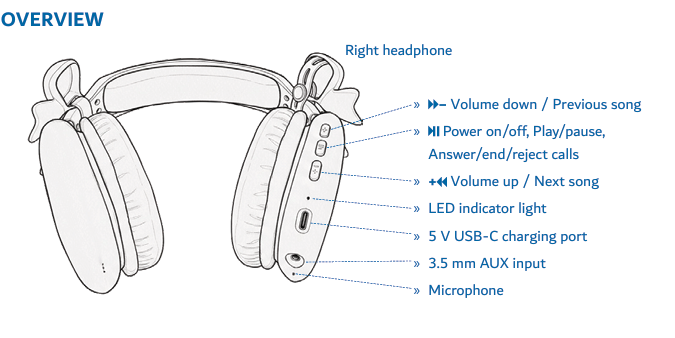
Use the buttons on the headphones for playback, volume, track and call controls:
1. Power on or off - press and hold the main button for about 3 seconds.
2. Play or pause - press the main button.
3. Volume up - press the plus button.
4. Volume down - press the minus button.
5. Next track - press and hold the plus button.
6. Previous track - press and hold the minus button.
7. Answer or end a call - press the main button.
8. Reject a call - press and hold the main button.
9. Redial - double-press the main button.
This applies to the Laser Kids Bow Design Wireless Headphones - Pink.
Was this article helpful?
That’s Great!
Thank you for your feedback
Sorry! We couldn't be helpful
Thank you for your feedback
Feedback sent
We appreciate your effort and will try to fix the article