Model reference: HP-BT26BL-974, HP-BT26PK-981, HP-BT26PP-998
Applies to: HP-BT26BL-974, HP-BT26PK-981, HP-BT26PP-998
If your SKU differs, search our support page by your Model SKU to find the correct article.
Use the supplied USB-A to USB-C charging cable with a suitable 5V USB-A power source.
To charge the Laser Wireless Foldable RGB Headphones:
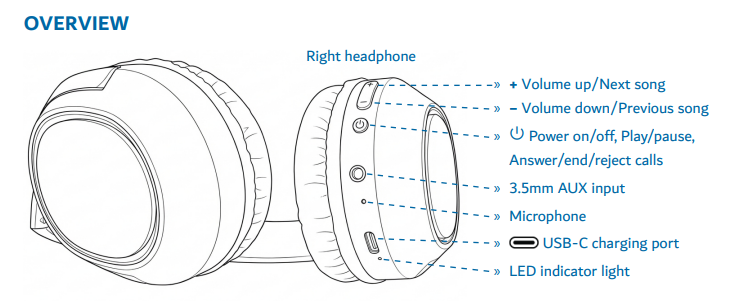
- Connect the USB-C end of the cable to the headphones.
- Connect the USB-A end to a suitable 5V USB-A power source, such as:
- Laptop USB port
- PC USB port
- Certified wall charger
- Car charger
- Powerbank
- The indicator light shows red while charging.
- When fully charged, the blue light stays on for 30 seconds, then turns off.
- Fully charge the headphones before first use.
Important safety note:
Do not use an unsuitable charging source such as 9V or 12V, as this may cause damage or safety risks.
Was this article helpful?
That’s Great!
Thank you for your feedback
Sorry! We couldn't be helpful
Thank you for your feedback
Feedback sent
We appreciate your effort and will try to fix the article