Question: How do I use the menu settings on the Laser Portable Monitor?
Answer:
Model reference: PC-156TOU-278
Applies to: PC-156TOU-278
If your SKU differs, search our support page by your Model SKU to find the correct article.
The Laser 15.6 Inch Portable Touchscreen Monitor has on-screen display menu controls for adjusting picture, input and other settings.
To use the menu:
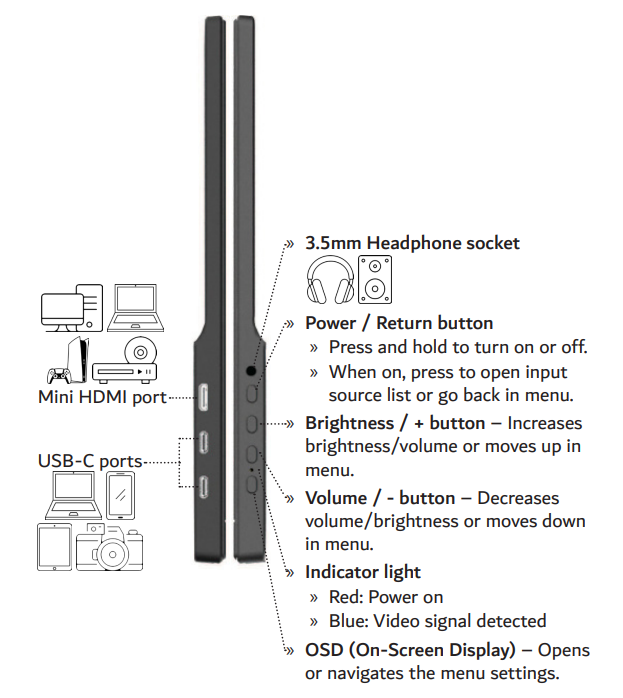
- Press the OSD button to open the menu on the screen.
- Press the plus and minus buttons to move through menu options or change values.
- Press the OSD button again to move into a submenu or confirm a setting.
- Use the Power button to go back one step or exit the menu.
Menu options may include:
- Brightness
- Contrast
- Eco mode
- Sharpness
- Dynamic Contrast Ratio
- Image aspect
- Colour temperature
- Language
- Reset
- Auto Powerdown
- HDR Mode
- Signal source
- Low Blue Light
- Volume
- Freesync
The menu layout and available options may vary slightly depending on the input source or connected device.
Was this article helpful?
That’s Great!
Thank you for your feedback
Sorry! We couldn't be helpful
Thank you for your feedback
Feedback sent
We appreciate your effort and will try to fix the article