Question: How do I connect the Laser Portable Monitor using USB-C?
Answer:
Model reference: PC-156TOU-278
Applies to: PC-156TOU-278
If your SKU differs, search our support page by your Model SKU to find the correct article.
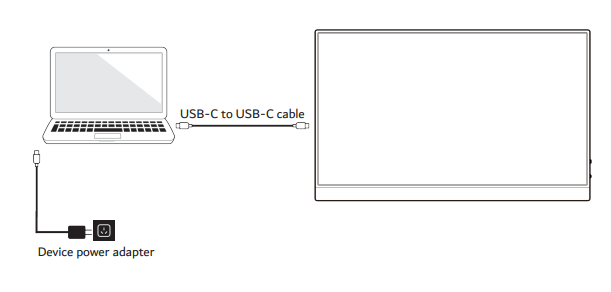
To connect the Laser 15.6 Inch Portable Touchscreen Monitor using USB-C:
- Turn off your laptop or device and unplug its power cable.
- Connect the USB-C cable between your device and the monitor.
- Plug in your laptop or device power adapter.
- Turn on both devices.
- Use your device display settings to duplicate or extend the screen.
Important notes:
- Your USB-C port and cable must support both video and power delivery for proper operation.
- Power can be connected directly to the monitor.
- The monitor can pass through power up to 100W to charge a compatible laptop or device.
- The included USB-C cable supports up to 60W.
- For passthrough charging, use a 100W cable and adapter.
Was this article helpful?
That’s Great!
Thank you for your feedback
Sorry! We couldn't be helpful
Thank you for your feedback
Feedback sent
We appreciate your effort and will try to fix the article