Question: How do I route the cable and finish the installation?
Answer:
Model reference: PC-SLG3WM-806
Applies to: PC-SLG3WM-806
If your SKU differs, search our support page by your Model SKU to find the correct article.
- Feed the Starlink cable through the hole on the side of the mast, then up through the slot in the adapter.
- Plug the cable into your Starlink and make sure the plug is fully inserted and sits flush with the surface.
- Slide the mast into place until it clicks.
- Fit the Starlink into the wall mount, then rotate it so it faces a clear view of the sky.
- Pass the cable through the hole at the top of the wall mount, fit the cover, then connect the Starlink cable to the router and connect the power.
- Use the app alert and alignment tool if rotation is needed, then tighten the thumb screw on the mast to stop it from rotating.
- The full product name is ChargeCore Starlink Gen3 V4 Wall Mount.
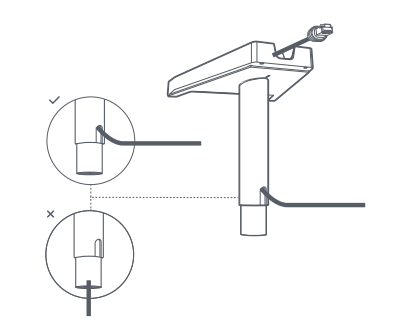
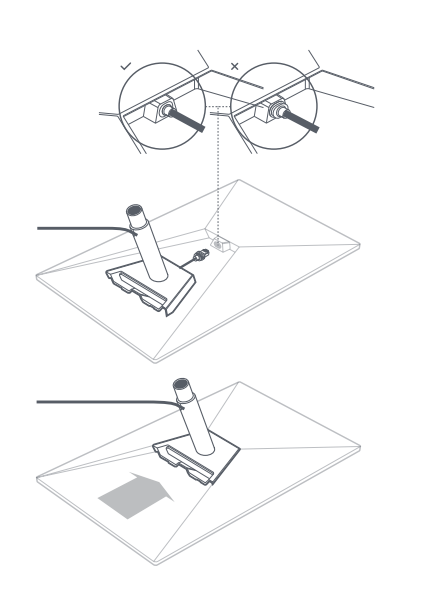
Was this article helpful?
That’s Great!
Thank you for your feedback
Sorry! We couldn't be helpful
Thank you for your feedback
Feedback sent
We appreciate your effort and will try to fix the article