Question: How do I connect the curved pole and secure the dish?
Answer:
Model reference: PC-SLG3EP-820
Applies to: PC-SLG3EP-820
If your SKU differs, search our support page by your Model SKU to find the correct article.
To connect the curved pole and secure the dish, follow the steps below.
Steps:
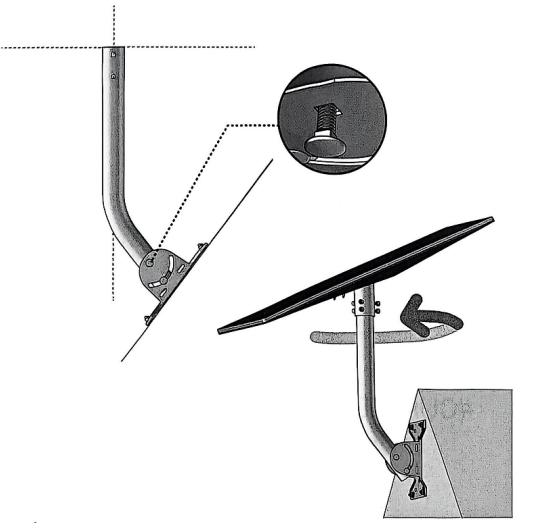
- Align the holes on the curved pole with the holes on the mount base.
- Insert the retaining bolts into the square holes.
- When the end of the curved pole is vertical, tighten the nut.
- Insert the other end of the pole into the pole adapter.
- Rotate the dish to the appropriate orientation.
- Secure it with six hexagonal screws to help prevent rotation.
Final check:
Check all connections before use and make sure the dish is stable.
These steps apply to the ChargeCore Starlink Gen3 V4 Elbow Pipe Mount.
Was this article helpful?
That’s Great!
Thank you for your feedback
Sorry! We couldn't be helpful
Thank you for your feedback
Feedback sent
We appreciate your effort and will try to fix the article