Question: How do I set up my Blu Ray player for the first time?
Answer:
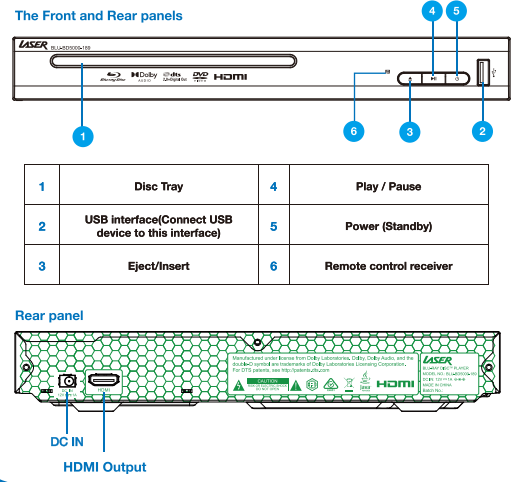
Connect the supplied power adapter to the DC IN port on the rear of the player.
Plug the adapter into a wall power outlet.
Connect an HDMI cable from the HDMI OUT port on the player to an HDMI input on your TV.
Turn on the TV and select the correct HDMI input.
Press the Power button to turn the player on.
When powered, the front panel LED indicates standby or active status.
This setup applies to the Laser Blu Ray Player Multi Region HDMI.
Was this article helpful?
That’s Great!
Thank you for your feedback
Sorry! We couldn't be helpful
Thank you for your feedback
Feedback sent
We appreciate your effort and will try to fix the article