Question: How do I change the region code on my Blu Ray player?
Answer:
You can manually change the region code using the player’s factory settings menu.
Before you begin:
Make sure there is no disc inside the player.
Steps to change the region code:
Power on the Blu Ray player and wait for the main Laser home screen.
Press the SETUP button on the remote control.
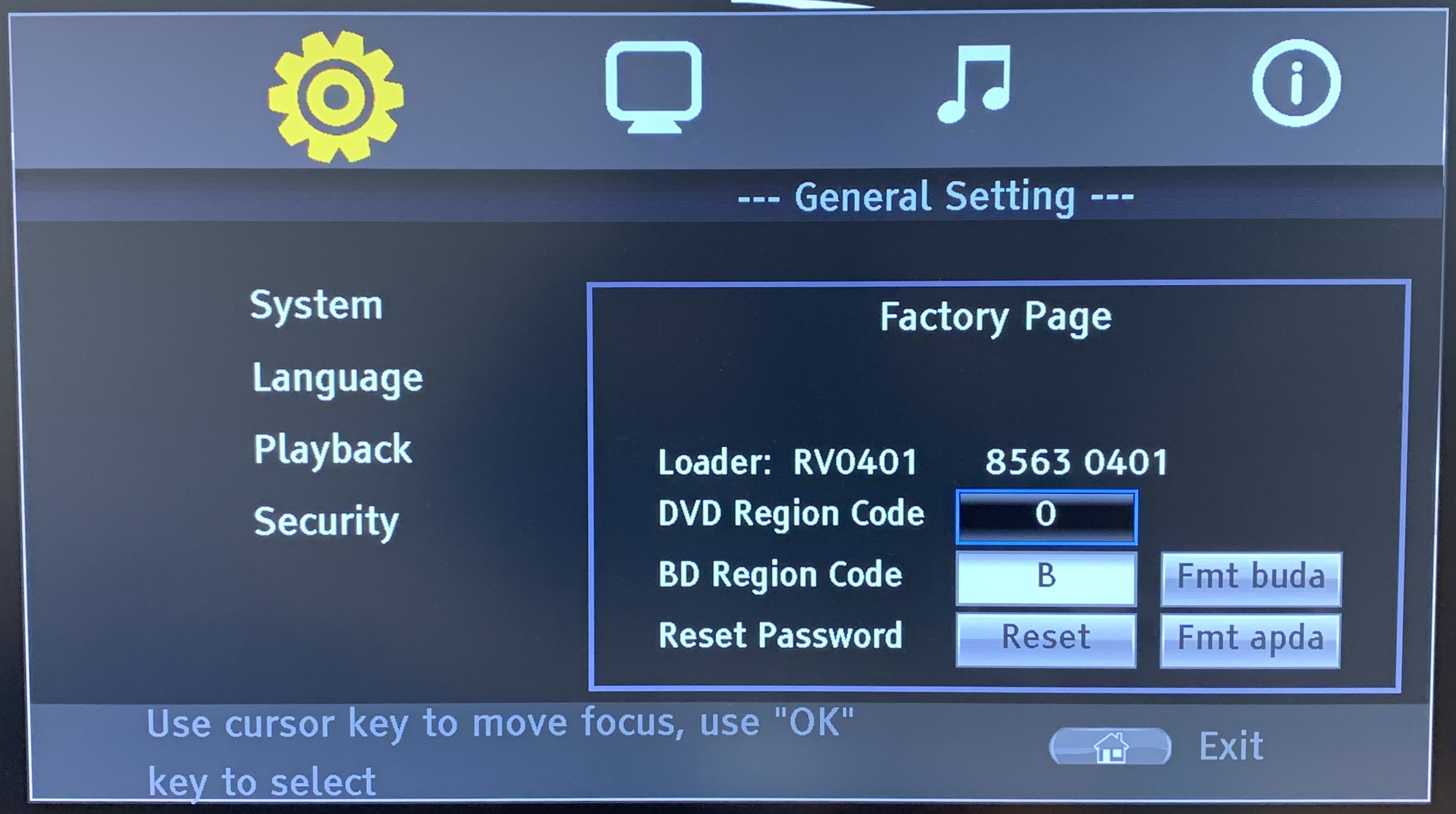
Navigate to the General Setting menu.
Using the remote, enter 8520 to access the Factory Page.
Highlight DVD Region Code. Press the number 0 on your remote to select the universal region-free code for DVDs.
Highlight the BD Region Code. Select the correct region using the following options
1 = Region A
2 = Region B
4 = Region C
Press OK to confirm your selection.
Exit the menu.
You will need to repeat this process each time you switch between discs from different regions.
This applies to the Laser Blu Ray Player Multi Region HDMI.
Was this article helpful?
That’s Great!
Thank you for your feedback
Sorry! We couldn't be helpful
Thank you for your feedback
Feedback sent
We appreciate your effort and will try to fix the article