Description:
Troubleshoot HDMI connection, TV input and video resolution issues.
Question:
Why is there no picture on my TV?
Answer:
Model reference: BLU-BD4K-384
Applies to: BLU-BD4K-384
If your SKU differs, search our support page by your Model SKU to find the correct article.
For the Laser 4K UHD Blu-ray Player with Multi-Region Playback, check the following:
1. Confirm the HDMI cable is firmly connected to the player's HDMI OUT port and an HDMI input on your TV.
2. Select the correct HDMI input on the TV.
3. Press HDMI on the remote to cycle through available output resolutions until a picture appears.
The player can cycle through 480i or 576i, 480p or 576p, 720p, 1080i, 1080p and 4K2K output resolutions.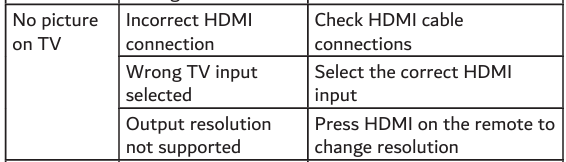
Was this article helpful?
That’s Great!
Thank you for your feedback
Sorry! We couldn't be helpful
Thank you for your feedback
Feedback sent
We appreciate your effort and will try to fix the article