Question: How do I set up the Laser Smart Gaming Projector for the first time?
Answer:
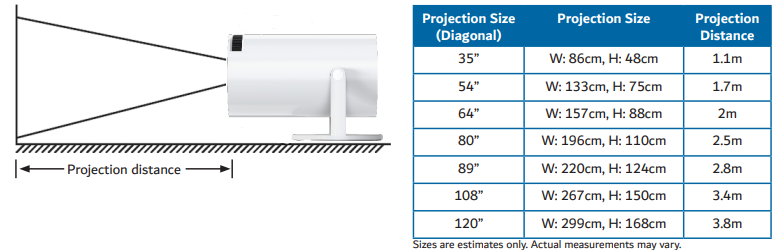
To set up the Laser Smart Gaming Projector, start by preparing the space and ensuring the projector is placed on a stable, flat surface. The manual recommends using a matte, neutral coloured wall and avoiding direct sunlight to maintain picture clarity.
Steps:
Place the projector directly in front of the wall or screen.
Ensure the lens has a clear view with no obstacles.
Connect the AC power cable and switch on the projector.
Use the focus wheel to sharpen the image.
Adjust keystone settings if the picture appears tilted.
The full product name Laser Smart Projector with Games White includes built in games and Wi Fi for streaming and app downloads.
Was this article helpful?
That’s Great!
Thank you for your feedback
Sorry! We couldn't be helpful
Thank you for your feedback
Feedback sent
We appreciate your effort and will try to fix the article