Description: Identify the mouse buttons, side controls, DPI switch and separate LED mode switch.
Question: What buttons and controls does the mouse have?
Answer:
Model reference: KBX-BDL26-503
Applies to: KBX-BDL26-503
If your SKU differs, search our support page by your Model SKU to find the correct article.
The mouse in the Laser 4-in-1 RGB Gaming Keyboard and Mouse Bundle has six programmable buttons.
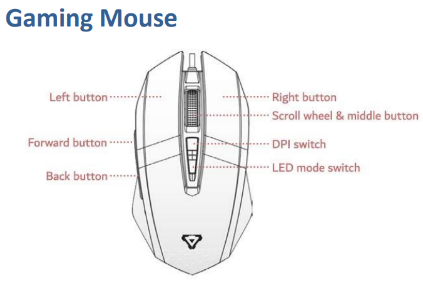
The mouse layout identifies:
- Left button
- Right button
- Scroll wheel and middle button
- Forward side button
- Back side button
- DPI switch
- Separate LED mode switch
Button-programming software and programming instructions: [Not specified in sources]. No software download or remapping procedure is provided in this article.
Was this article helpful?
That’s Great!
Thank you for your feedback
Sorry! We couldn't be helpful
Thank you for your feedback
Feedback sent
We appreciate your effort and will try to fix the article