Description: Use the keyboard controls to change backlighting, lighting effects, brightness and effect speed.
Question: How do I change the keyboard lighting?
Answer:
Model reference: KBX-BDL26-503
Applies to: KBX-BDL26-503
If your SKU differs, search our support page by your Model SKU to find the correct article.
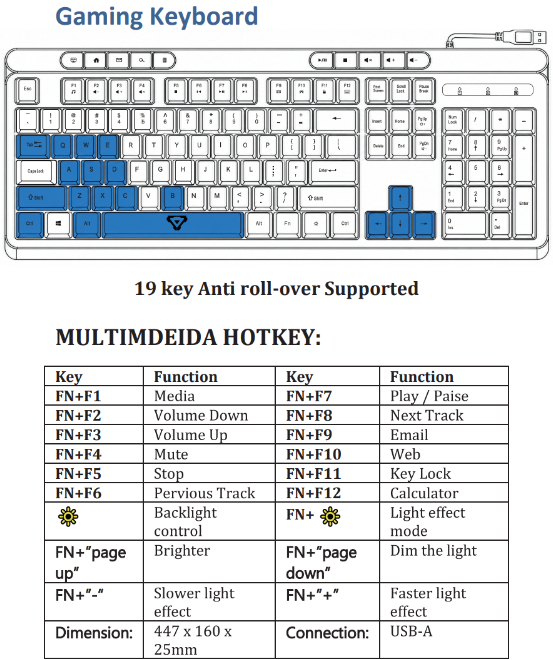
The Laser 4-in-1 RGB Gaming Keyboard and Mouse Bundle has onboard keyboard lighting controls:
- Press the key with the sun symbol for backlight control.
- Press FN and the sun-symbol key to change the light effect mode.
- Press FN and Page Up to make the light brighter.
- Press FN and Page Down to dim the light.
- Press FN and the minus key to slow the light effect.
- Press FN and the plus key to speed up the light effect.
These controls apply to the keyboard. They do not establish shared lighting control for the mouse or headset.
Was this article helpful?
That’s Great!
Thank you for your feedback
Sorry! We couldn't be helpful
Thank you for your feedback
Feedback sent
We appreciate your effort and will try to fix the article