Description: Use the DPI switch and the documented colour indicators to identify the six sensitivity settings.
Question: How do I change mouse sensitivity and identify the DPI setting?
Answer:
Model reference: KBX-BDL26-503
Applies to: KBX-BDL26-503
If your SKU differs, search our support page by your Model SKU to find the correct article.
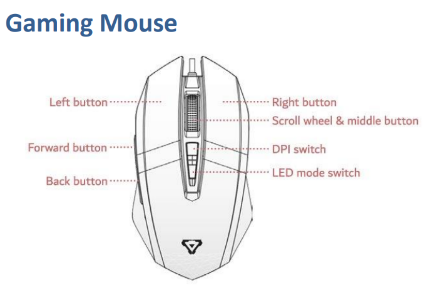
Use the DPI switch on the mouse in the Laser 4-in-1 RGB Gaming Keyboard and Mouse Bundle to change its sensitivity. The documented settings and colours are:
- 1200 DPI: Yellow
- 1600 DPI: Blue
- 2400 DPI: Purple
- 3200 DPI: Green
- 4800 DPI: Red
- 7200 DPI: Cyan
Choose the sensitivity that suits your preferred cursor movement. The mouse also has a separate LED mode switch.
Was this article helpful?
That’s Great!
Thank you for your feedback
Sorry! We couldn't be helpful
Thank you for your feedback
Feedback sent
We appreciate your effort and will try to fix the article