Question: How do I set up the system and what is included?
Answer:
Model reference: CD-MCHFFM-428
Applies to: CD-MCHFFM-428
If your SKU differs, search our support page by your Model SKU to find the correct article.
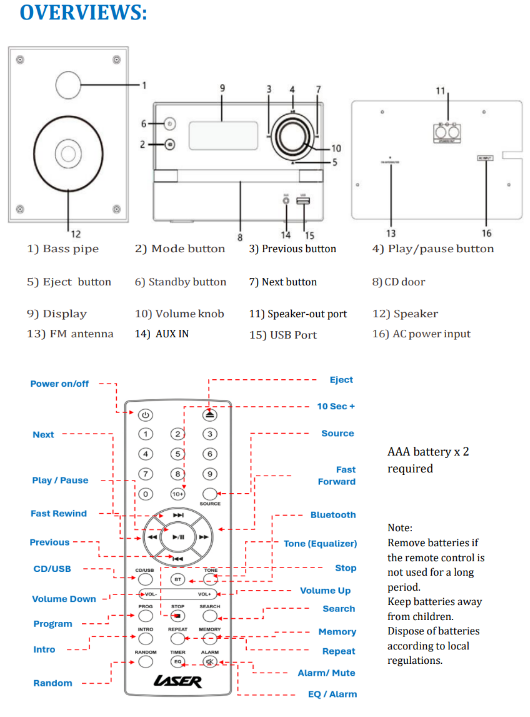
The Laser CD Micro Hi-Fi System with Bluetooth includes the main unit, two speakers, a remote control and user manual.
1. Connect the supplied speakers to the speaker-out connections on the rear of the main unit.
2. Check that the mains voltage matches the rating on the rear of the unit.
3. Connect the power cord to a wall power outlet and switch it on. The display will show the clock.
4. Use Power/Standby to switch between standby and operation.
The system requires mains power. The remote requires two AAA batteries. The batteries and a suitable AUX cable are listed as items you may also need, rather than included accessories.
Place the unit on a stable, flat, dry surface with adequate ventilation. Keep it away from rain, splashes and wet locations.

Was this article helpful?
That’s Great!
Thank you for your feedback
Sorry! We couldn't be helpful
Thank you for your feedback
Feedback sent
We appreciate your effort and will try to fix the article