Description:
How to position, inflate and secure the supplied inflatable screen and the outdoor conditions required for safe use.
Question:
How do I set up the inflatable screen safely outdoors?
Answer:
Model reference: PJ-CBFAC1-827
Applies to: PJ-CBFAC1-827
If your SKU differs, search our support page by your Model SKU to find the correct article.
To set up the inflatable screen supplied with the Laser 1080p Smart Outdoor Projector with 144-inch Screen and Soundbar:
1. Choose a flat, stable area that is free of sharp objects and large enough for the screen and projector setup.
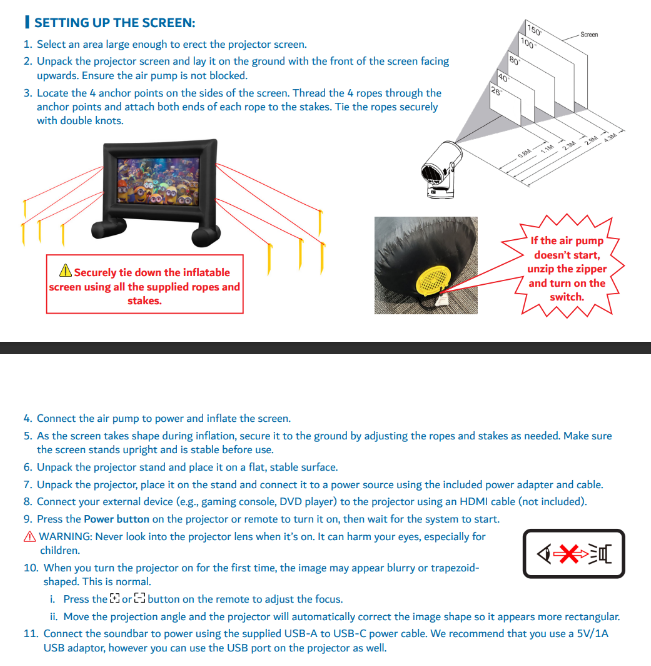
2. Lay the screen on the ground with the front facing upwards and make sure the air pump is not blocked.
3. Thread the 4 supplied ropes through the 4 screen anchor points.
4. Attach both ends of each rope to the supplied stakes and tie the ropes securely with double knots.
5. Drive the stakes into the ground at about a 45-degree angle away from the screen.
6. Connect the air pump to power and inflate the screen.
7. As the screen inflates, adjust the ropes and stakes so it stands upright, stable and taut without being overstretched.
8. Make the ropes and stakes visible to reduce trip hazards.
Outdoor conditions matter:
- Do not use the projector in storms, rain, wind or snow.
- The projector is not dustproof or waterproof.
- Keep the screen away from heaters, radiators, air conditioners and other heat sources.
- Keep children and pets away from the installation area while setting up.
- The projector works best in dark conditions, away from strong street or backyard lighting.
If the screen air pump does not start, unzip the zipper and turn on the switch as shown in the Quick Start Guide.
Was this article helpful?
That’s Great!
Thank you for your feedback
Sorry! We couldn't be helpful
Thank you for your feedback
Feedback sent
We appreciate your effort and will try to fix the article