Question: What do the LED display and fast-charging icon mean on my Laser Power Bank?
Answer:
Model reference: PB-LP10BK-070 / PB-LP10CL-087 / PB-LP10GR-094
Applies to: PB-LP10BK-070, PB-LP10CL-087 and PB-LP10GR-094
If your SKU differs, search our support page by your Model SKU to find the correct article.
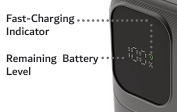
The LED display on the Laser 10000mAh LiFePO4 CCC Power Bank provides the following information:
- Battery percentage: Shows the remaining power bank battery level.
- Fast-charging icon: Appears when fast charging is active with a compatible device.
- Low-battery warning: The display flashes when the battery level falls below 5%.
- Automatic screen timeout: The display switches off after 30 seconds without activity.
To operate the display and power controls:
1. Press the Power button once to turn the power bank on.
2. Press the Power button twice to turn it off.
3. Connecting a device or charging source also turns the power bank on automatically.
If the display flashes below 5%, recharge the power bank before continued use.
Was this article helpful?
That’s Great!
Thank you for your feedback
Sorry! We couldn't be helpful
Thank you for your feedback
Feedback sent
We appreciate your effort and will try to fix the article