Question: How do I charge phones and other devices with the Laser 10000mAh Power Bank?
Answer:
Model reference: PB-LP10BK-070 / PB-LP10CL-087 / PB-LP10GR-094
Applies to: PB-LP10BK-070, PB-LP10CL-087 and PB-LP10GR-094
If your SKU differs, search our support page by your Model SKU to find the correct article.
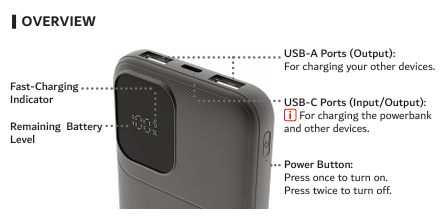
The Laser 10000mAh LiFePO4 CCC Power Bank has three charging ports:
- 1 x USB-C port for input and output
- 2 x USB-A ports for output only
To charge a device:
1. Connect the device to the appropriate USB-C or USB-A port using a compatible cable.
2. The power bank starts charging the connected device automatically.
3. Check the LED display for the remaining power bank battery level.
4. The fast-charging icon appears when a compatible device is fast charging.
The power bank can charge up to three compatible devices at once. It supports compatible iPhone, iPad, Android, Nintendo Switch, earbuds and other USB-powered devices.
The USB-C port supports Power Delivery output up to 20W when used independently. When USB-C and USB-A outputs are used together, combined output is limited to 10W maximum. Fast charging requires a compatible device and charging cable.
Was this article helpful?
That’s Great!
Thank you for your feedback
Sorry! We couldn't be helpful
Thank you for your feedback
Feedback sent
We appreciate your effort and will try to fix the article