Question: How do I recharge and set up my Laser 10000mAh Power Bank?
Answer:
Model reference: PB-LP10BK-070 / PB-LP10CL-087 / PB-LP10GR-094
Applies to: PB-LP10BK-070, PB-LP10CL-087 and PB-LP10GR-094
If your SKU differs, search our support page by your Model SKU to find the correct article.
Follow these steps to recharge the Laser 10000mAh LiFePO4 CCC Power Bank:
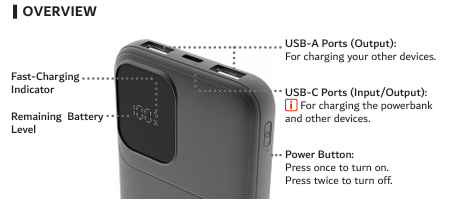
1. Connect the included USB-C to USB-C cable to the power bank's USB-C port.
2. Connect the other end to a suitable USB-C power source.
3. When using a wall charger, use a certified charger rated at 5V/2A or higher with an RCM compliance mark.
4. Place the power bank on a hard, flat surface in an open and well-ventilated area.
5. The power bank turns on automatically when connected to a charging source.
6. The LED screen shows the remaining battery percentage. A fast-charging icon appears when fast charging is active.
7. Unplug the power bank once it is fully charged.
Recharge time is up to 2.5 hours with a suitable PD wall adaptor or up to 5 hours with a 10W wall adaptor. Charging time can vary with the power source, cable and charging conditions.
Do not charge the power bank under pillows, blankets or inside bags, as heat can build up. Use it between 0 and 35 degrees Celsius.
Was this article helpful?
That’s Great!
Thank you for your feedback
Sorry! We couldn't be helpful
Thank you for your feedback
Feedback sent
We appreciate your effort and will try to fix the article