Question: How do I charge the Laser Kids Play Phone Camera?
Answer:
Model reference: CA-KPHNPP-117 (Purple)
Applies to: CA-KPHNPP-117
If your SKU differs, search our support page by your Model SKU to find the correct article.
To charge the Laser Kids Play Phone with Camera and MP3 Playback - Purple:
1. Connect the USB-C cable to the USB-C port on the camera.
2. Connect the other end to a 5 V / 1 A power source, such as a laptop, PC, wall charger or suitable USB power source.
3. Check the battery icon on the screen for charging status.
4. Allow approximately 3 hours for a typical full charge.
Important charging notes:
- Fully charge the device before first use.
- Do not use fast chargers.
- Do not use the camera while it is charging.
- For children aged 16 years or younger, charging should be done by an adult or under adult supervision.
- Keep the charging port clean and dry.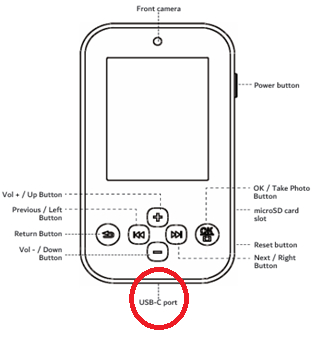
Was this article helpful?
That’s Great!
Thank you for your feedback
Sorry! We couldn't be helpful
Thank you for your feedback
Feedback sent
We appreciate your effort and will try to fix the article