Question: How do I record onto a cassette with the Laser Portable Cassette Player?
Answer:
Model reference: SP-CASPLB-322
Applies to: SP-CASPLB-322
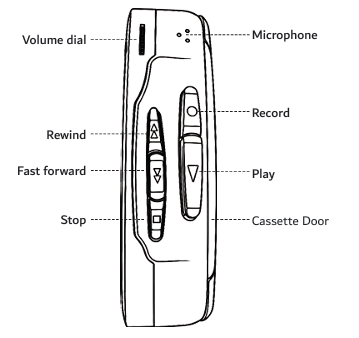
You can record sound directly using the built-in microphone on the Laser Portable Cassette Player with Bluetooth - Black.
To record:
1. Insert a blank cassette tape.
2. Press the Record button and Play button together.
3. Speak normally toward the built-in microphone.
4. To stop recording, press Stop.
For better recording quality:
- Keep the microphone clear and uncovered.
- Place the player close to the sound source.
- Allow the tape to run for about 5 seconds before recording, as the start of the tape contains leader tape with no recording area.
You can also rewind and record again to replace previous recordings.
Was this article helpful?
That’s Great!
Thank you for your feedback
Sorry! We couldn't be helpful
Thank you for your feedback
Feedback sent
We appreciate your effort and will try to fix the article