Model reference: HP-BT26BL-974, HP-BT26PK-981, HP-BT26PP-998
Applies to: HP-BT26BL-974, HP-BT26PK-981, HP-BT26PP-998
If your SKU differs, search our support page by your Model SKU to find the correct article.
To pair the Laser Wireless Foldable RGB Headphones with Bluetooth:
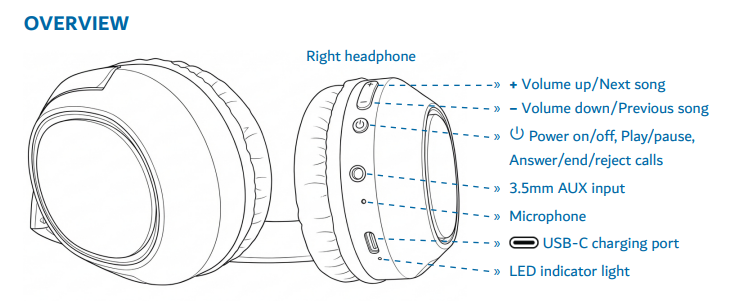
- Press and hold the Power button for about 3 seconds to turn the headphones on.
- The light will blink red and blue alternately when the headphones are in pairing mode.
- Open Bluetooth settings on your phone, tablet, computer or compatible device.
- Select HP-BT26 from the Bluetooth device list.
- Once connected, the blue light blinks every 6 seconds.
If HP-BT26 does not appear:
Refresh or search again in your Bluetooth settings. It may take up to 1 minute for the headphones to appear.
Was this article helpful?
That’s Great!
Thank you for your feedback
Sorry! We couldn't be helpful
Thank you for your feedback
Feedback sent
We appreciate your effort and will try to fix the article