Description:
Use a 3.5 mm AUX cable for wired audio and follow the correct steps to switch from Bluetooth to AUX mode.
Question:
How do I use the AUX input on the RGB Lava Lamp Speaker?
Answer:
Model reference: SP-RGLAVA-282
Applies to: SP-RGLAVA-282
If your SKU differs, search our support page by your Model SKU to find the correct article.
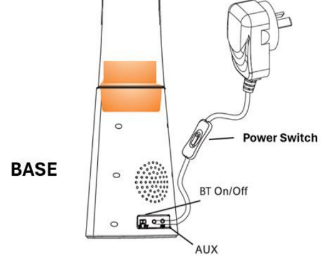
To use AUX playback on the Laser RGB Bluetooth Lava Lamp Speaker, connect your music player to the speaker with a 3.5 mm AUX cable.
The user manual lists an AUX cable under You May Also Need, not under What's in the Box.
Important: the lamp starts in Bluetooth mode even if an AUX cable is already connected. To switch to AUX mode, unplug the AUX cable and insert it again.
When using AUX, play, pause, next track and previous track functions need to be controlled from your connected device.
Was this article helpful?
That’s Great!
Thank you for your feedback
Sorry! We couldn't be helpful
Thank you for your feedback
Feedback sent
We appreciate your effort and will try to fix the article