Description:
How to pair the supplied Bluetooth remote and understand the red IR mode and blue Bluetooth mode indicator lights.
Question:
How do I pair or reconnect the Bluetooth remote control?
Answer:
Model reference: PJ-CBFAC1-827
Applies to: PJ-CBFAC1-827
If your SKU differs, search our support page by your Model SKU to find the correct article.
The Bluetooth remote supplied with the Laser 1080p Smart Outdoor Projector with 144-inch Screen and Soundbar can operate in IR mode or Bluetooth mode.
When a button is pressed:
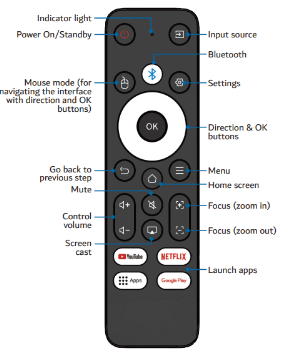
- A red indicator flash means the remote is in IR mode. Point the remote towards the projector.
- A blue indicator flash means the remote is in Bluetooth mode. It does not need to be pointed directly at the projector when used within range.
To pair the remote:
1. Press the Bluetooth button on the remote.
2. Wait for the pairing instructions to appear on screen.
3. Press and hold the Left and Right buttons together.
4. Release both buttons when the indicator starts flashing blue.
5. Wait until the indicator stops flashing.
The remote is then paired.
When the projector is turned off, the Bluetooth connection disconnects automatically. After turning the projector back on, press the Bluetooth button on the remote to reconnect it.
Was this article helpful?
That’s Great!
Thank you for your feedback
Sorry! We couldn't be helpful
Thank you for your feedback
Feedback sent
We appreciate your effort and will try to fix the article