Description: Follow the main installation stages shown in the supplied guide.
Question: How is the tilt TV wall mount installed?
Answer: Model reference: TVB-LP38-6T_537 (86 Inch) Applies to: TVB-LP38-6T_537 If your SKU differs, search our support page by your Model SKU to find the correct article.
The Laser Tilt TV Wall Mount for TVs up to 86 Inch should be installed by a professional using the full supplied installation guide.
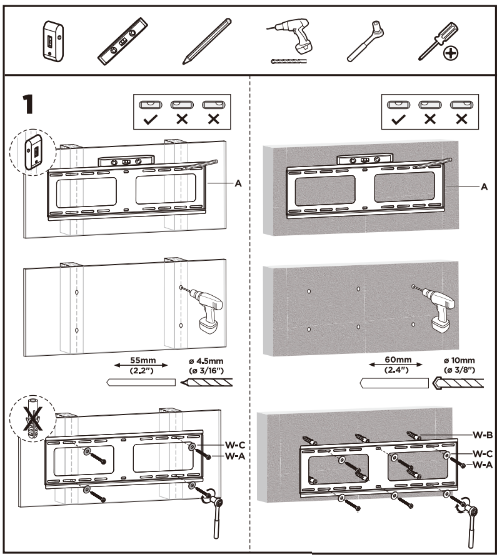
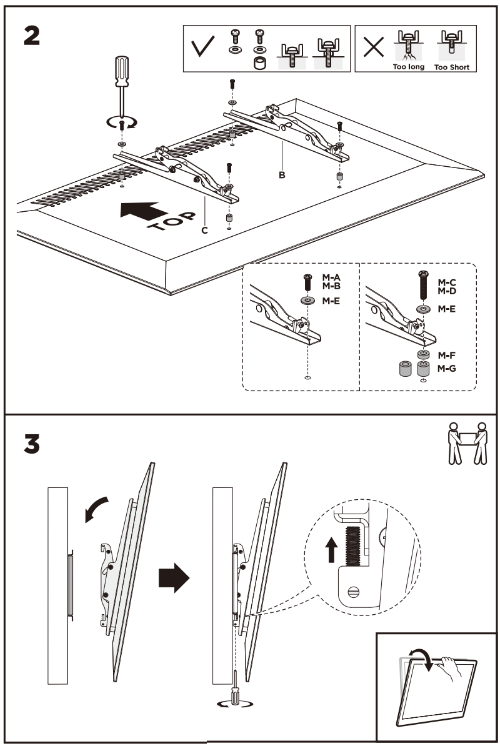
The main installation stages are:
- Confirm the TV's weight, VESA pattern and screw requirements.
- Attach the two mounting rails to the back of the TV using the correct supplied screws, washers and spacers.
- Identify suitable wood studs or a solid concrete, brick or masonry wall.
- Position and level the wall plate, then mark and drill the fixing points shown in the guide.
- Secure the wall plate using the correct supplied wall hardware for the mounting surface.
- With two people, lift the TV onto the wall plate.
- Secure the lower retaining points and confirm that the TV and all joints are firmly attached.
Do not begin installation if any component is missing or damaged. Contact the retailer or distributor for assistance.
Was this article helpful?
That’s Great!
Thank you for your feedback
Sorry! We couldn't be helpful
Thank you for your feedback
Feedback sent
We appreciate your effort and will try to fix the article