Question: How do I install the Laser Ultra-Slim Fixed TV Wall Mount?
Answer:
Model reference: TVB-LUP70-6F
Applies to: TVB-LUP70-6F
If your SKU differs, search our support page by your Model SKU to find the correct article.
To install the Laser Ultra-Slim Fixed TV Wall Mount for 43 to 80 Inch Panels:
1. Confirm the TV size, weight and exact VESA mounting pattern.
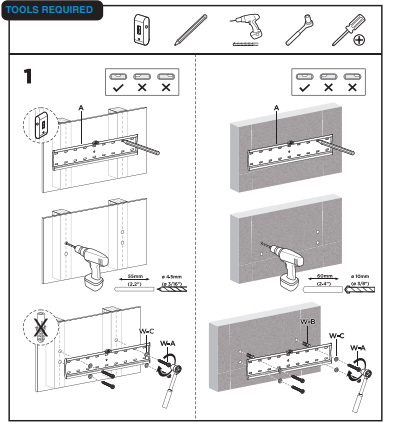
2. Identify a structurally suitable wall location.
3. Secure the wall plate to suitable timber studs or masonry fixing points.
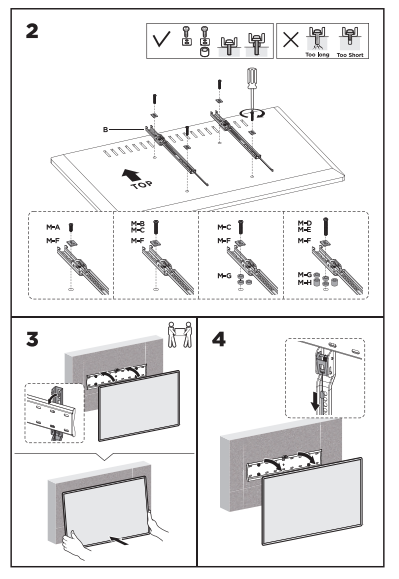
4. Attach the two mounting rails to the rear of the TV using the correct supplied screw and spacer combination.
5. With assistance, lift the TV and hook both mounting rails securely onto the wall plate.
6. Secure the lower locking points as shown in the user manual.
7. Confirm the TV is firmly mounted before releasing it.
Use two people when lifting and positioning the TV. If you are unsure about the wall structure or installation method, use a suitably qualified installer.
Was this article helpful?
That’s Great!
Thank you for your feedback
Sorry! We couldn't be helpful
Thank you for your feedback
Feedback sent
We appreciate your effort and will try to fix the article